
Android Oreo features
Some Android O features hide under the hood, others show up immediately on the surface. Since the former will affect all devices, we will begin with them. The latter are immediately visible with the Nexus and Pixel devices, but are often not used by manufacturers in their own UIs and are therefore less important, so we will detail them last.
- Core features: battery life, updates, security
- Hardware support: Hi-Fi via Bluetooth and HDR displays
- Surface features: Emoji, notifications and picture-in-picture
Android O core features
- Power saving thanks to Android O
- Earlier updates thanks to Project Treble
- Apps and reboots are faster with Android O
- Apps are better thanks to Google Play Protect and tougher enforcement of criteria
- Wi-Fi Aware (also known as Neighbor Awareness Networking or NAN)
- Autofill revolutionizes password management
- Bootloop prevention with Rescue Party
Power saving thanks to Android O
To protect users' battery life and performance, Google has put automatic limits on app background activities in Android O. These background limits will specifically include implicit broadcasts, background services and location updates. For users, this means less energy consumption, and ultimately, longer battery life
Android O makes it easier to find the apps that consume the most battery power. Usually Facebook or WhatsApp end up in the list. But only with Android O can you see if the apps have been draining your battery with background activities, or whether they are only using battery life when you're in the app.
Apps and reboots are faster with Android O
Optimizations in the system should cut device restart time in half and dramatically increase app performance. This is evident from independent reports from XDA and Android Police.
Apps are better thanks to Google Play Protect and tougher enforcement of criteria
Google Play Protect is a background service that will optimize security on Android by analyzing the behavior of apps to detect malware, and remove it from your phone and from the Play Store.
Google is also increasing pressure on app developers to increase the performance and stability of their apps. If they fall in the bottom 25 percent, they are warned and then removed from the Play Store if there's no improvement.
Wi-Fi Aware (also known as Neighbor Awareness Networking or NAN)
Wi-Fi Aware (also known as Neighbor Awareness Networking or NAN): This function basically works so that devices with compatible hardware can communicate when they are close, via Wi-Fi Aware, without necessarily having to use the internet connection.
Autofill revolutionizes password management
Google is bringing a system-wide Autofill API to Android O, allowing all of your passwords to be managed in a central place. This will mean convenience and security when logging into apps and filling out forms, since there won't be any need to copy/paste usernames and passwords anymore.
Rescue Party
Another new Android 8.0 feature has been announced. Rescue Party will help prevent bootloops, one of the most dreaded mobile phone issues. When core system components are crashing over and over again, Android will notice and take steps to recover the device. As a final resort, it will reboot into Recovery Mode and give the option to factory reset the device. This feature will be enabled by default and doesn't require any special hardware, though it's only for phones running Android Oreo.
Android O hardware support
HDR displays are officially supported
HDR is an interesting feature, but there was little support on the system side. Now, apps can define how to save and display image resources with a wide range of colors. Google says this is especially relevant for image processing apps.
Better Bluetooth support
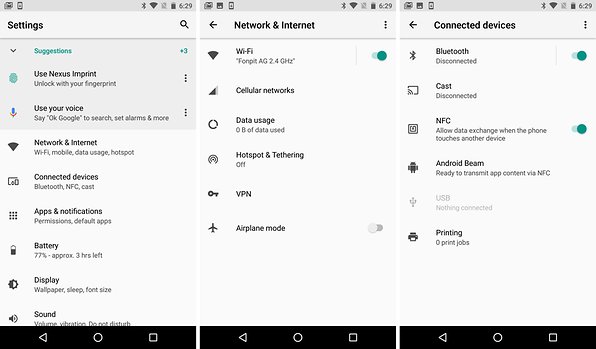
Android O supports high-quality Bluetooth audio and codecs such as LDAC. Sony is helping Google in the development of LDAC audio wireless technology. According to the company, LDAC can transfer a larger volume of data through Bluetooth, with a bit rate of more than 990 kbps. In other words, this means better audio quality for devices running with Android O. There is also AAudio, a new Android native API designed for applications that require high-performance, low-latency audio quality. Applications that use AAudio can read and save data via stream.
Android O surface features
- Text selection gets smarter
- New round emoji
- Adaptive icons
- Notification channels and dots
- Widgets are easier to integrate
- Search and find app info
- Picture in Picture
- Animated clock icon
Text selection gets smarter
Copy/pasting on mobile is about to get easier, and smarter. Using machine learning, Android will recognize when you're trying to copy/paste an address, URL or phone number and select the whole thing for you automatically, instead of just one word.
Adaptive icons
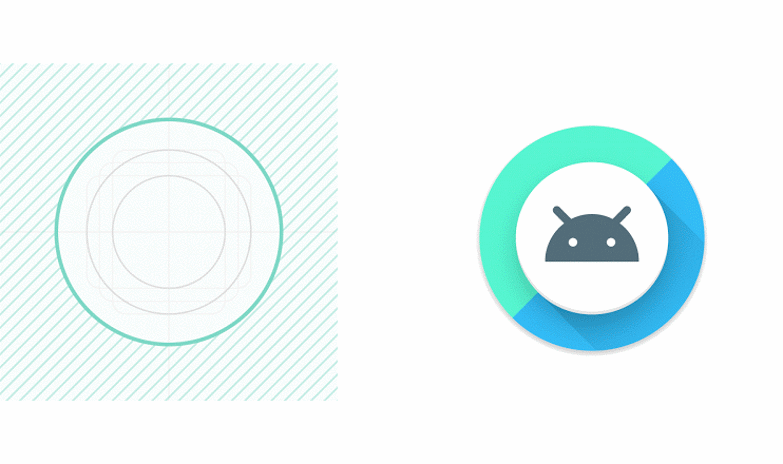
App icons will adapt automatically to the manufacturer's UI. The appearance of app icons differs across the wide range of devices running Android. Thus, an app icon may appear to be circular in the launcher of one device and square in another. That, of course, depends on the manufacturer's skin, but it's cool to see that Google will now offer a standard for adapting application icons to the UI (if the developer does).
Notification channels and dots
Once again, Google is bringing changes to notifications with the introduction of Notification Channels and Notification Dots. Notification channels are new categories for notifications that give users very detailed control over notifications. Block or change notifications settings not just by app, but by channel or topic. These channels are visually grouped together on the notification shade.
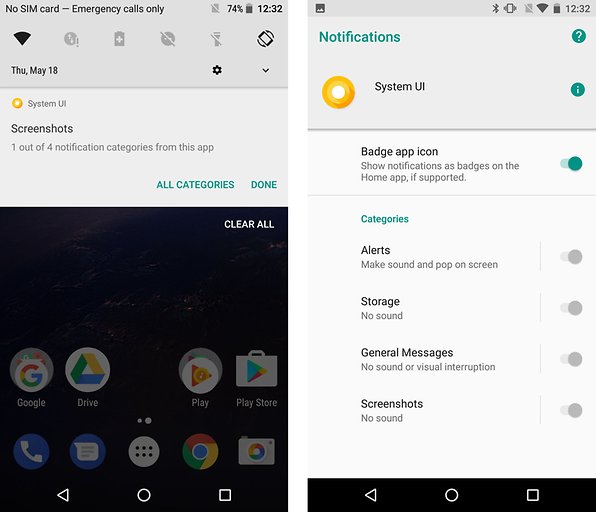
Small circles will appear on top of your app icons when you have unread notifications, and long pressing them will give you a preview of the notification. This will be standardized in Android O, much like in iOS and various alternative Android launchers.
Widgets are easier to integrate
It's now easier to integrate widgets to your home screen. Rather than digging through the alphabetical list of widgets as in previous versions of Android, you can now long press the icon of the app you want a widget for and then select one of its available widgets.

No comments:
Post a Comment